
How to Use Claude AI for Business Growth in 2026
7 ready-to-use Claude prompts — built on the Role, Context, Task, Constraints, Output formula — for business strategy, content, competitor research, ad performance, SEO, sales calls and monthly reporting.

Most business owners who’ve tried Claude or ChatGPT have had the same experience. You open the chat, ask a question, get something useful, copy it into a doc, and move on. Then next week you’re back doing the same thing from scratch — writing a new prompt, explaining the same context again, hoping for a similar result.
That’s not really using AI in a business. That’s using a smarter search bar.
The businesses actually getting value from Claude in 2026 have stopped treating it as a one-off question machine. They’ve built small, repeatable systems around it — for research, for content, for reporting, for the parts of the job that eat hours every week without needing a human’s full judgment. This article walks through the exact formula and 7 example prompts you can copy today.
What Claude Actually Is in 2026 (Beyond the Chat Window)
If the last time you looked at Claude closely was a year or two ago, it’s worth a quick reset, because the product has moved well past “chatbot.”
Claude Chat, Projects, and Artifacts
The familiar chat interface is still there, and it’s still where most people start. Projects let you group a set of documents, instructions, and conversations around one ongoing piece of work — a client, a campaign, a quarter — so Claude has consistent context instead of starting cold every time. Artifacts let Claude produce an actual document, spreadsheet, or interactive file you can keep working on, rather than a wall of text you have to reformat yourself.
Claude Code and Claude Cowork
These two matter more for business owners than most people realize, even if you don’t write code. Claude Code is Anthropic’s agentic coding tool — it can build and modify software, and it’s available through the terminal, a desktop app, and inside editors like VS Code. Claude Cowork is the non-developer equivalent: a desktop app built for knowledge work (which you can also reach from the Claude mobile app), where Claude can work across your files and connected tools to complete a task end to end, rather than you managing every step of a conversation.
Connectors, Skills, and Integrations
Claude can now connect to external tools — email, calendars, project trackers, spreadsheets — through what Anthropic calls MCP connectors, and to specific apps like Claude in Chrome, Claude in Excel, and Claude in PowerPoint. Skills are reusable sets of instructions and tools that make Claude noticeably better at a specific type of work — think of a Skill as a trained specialty rather than a general assistant guessing at your preferences each time.
None of this is about collecting features. It’s about understanding that Claude in 2026 can genuinely do work across your files and tools, not just answer questions about them.
The Formula Behind Every Good Claude Prompt
Before the 7 examples below, it helps to understand the one pattern behind all of them. Vague prompts like “create a marketing strategy for my business” fail because Claude doesn’t know your business, audience, goal, budget, or what the final answer should look like. Every prompt in this guide is built the same way:
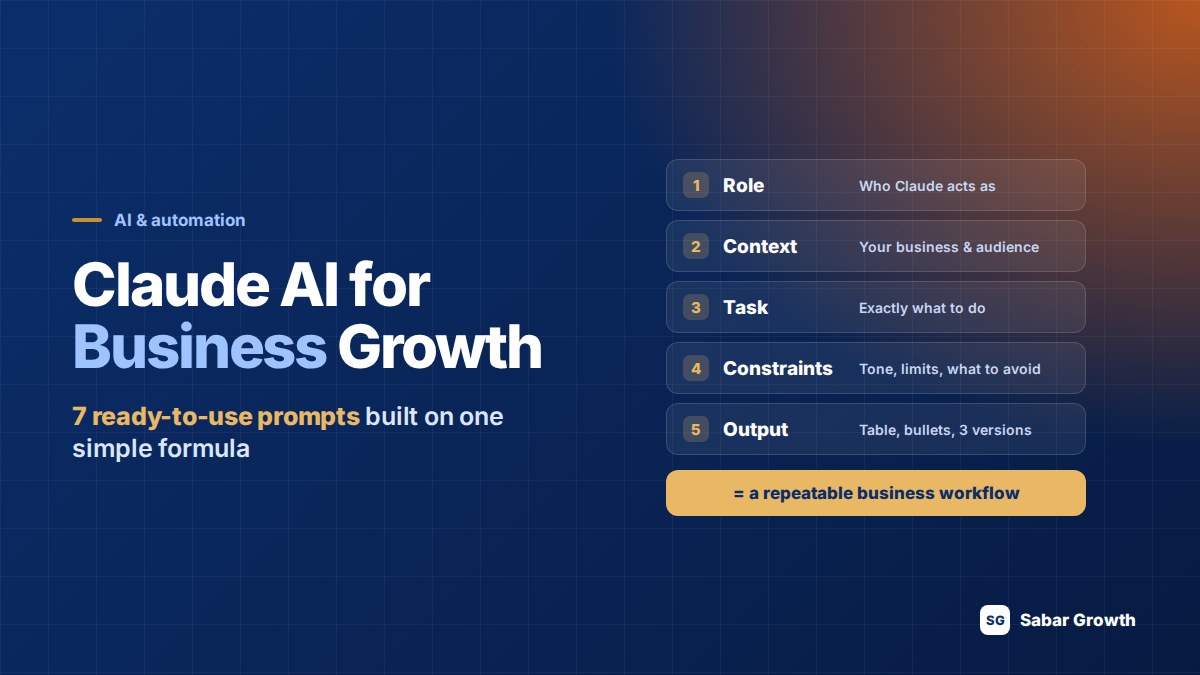
The Role + Context + Task + Constraints + Output Formula
- Role — who should Claude act as? (“Act as a digital marketing strategist.”)
- Context — what does Claude need to know? (Business, audience, location, background.)
- Task — what exactly should Claude do? (Create, analyse, compare, rewrite, plan.)
- Constraints — what should it follow or avoid? (Tone, length, audience, things to avoid.)
- Output — how should the answer look? (Table, bullets, 3 versions, 90-day plan.)
Each one, in one simple sentence — that’s the whole formula, for any business, any prompt.
Here’s the same idea at a system level — how a single good prompt becomes something your whole team can rely on:
The Prompt → Workflow → Process → Business Outcome Framework
- Prompt — a single question or request. Useful, but disposable.
- Workflow — a prompt built with enough structure that someone else on your team could run it and get a comparable result.
- Process — that workflow with a defined trigger, owner, and place it lives, so it runs the same way every time.
- Business outcome — what you actually cared about: faster audits, more consistent content, cleaner reporting, better decisions.
Most people stop at the first step. The value is in getting to the third. Below are 7 prompts, built on the formula above, covering the business tasks that come up most often.
7 Claude Prompts You Can Use Today
1. Business Strategy
Instead of asking something broad like “Create a marketing strategy for my business,” give Claude your actual goal, budget, and channels:
Try this prompt
Act as a digital marketing strategist. I run a dental clinic in Muscat, Oman. Our main goal is to generate more appointment enquiries from people within 10 km of the clinic. Our monthly advertising budget is 300 OMR. Our main channels are Meta Ads and Google Ads. Create a 90-day marketing strategy covering campaign structure, target audience, budget allocation, creative strategy, lead generation and KPIs. Separate the strategy into month 1, month 2 and month 3.
2. Content Creation
The same swap applies to content — replace “Write an Instagram caption for my business” with the audience, tone, and format you actually need:
Try this prompt
Act as a social media content strategist. Write an Instagram caption for a dental clinic in Oman promoting a dental consultation. The audience is adults aged 25–45. The tone should be professional, friendly and trustworthy. Avoid exaggerated medical claims. Start with a strong hook, explain the benefit in simple language and finish with a clear appointment CTA. Give me 3 different versions.
Using Claude for Business Strategy and Competitor Research
3. Competitor Analysis
Instead of asking Claude something broad like “Analyze my competitors,” give it a structured research prompt and a defined output shape:
Try this prompt
Act as a competitive marketing analyst. I will provide the websites of three competitors. Compare their positioning, services, SEO content, Google Ads messaging, landing pages, offers and calls to action. Create a comparison table first. Then identify 5 opportunities my business can use to differentiate itself. Do not make assumptions about information that is not available on their websites.
Using Claude for Marketing, SEO, and Content
This is where the workflow habit pays off fastest, because marketing work is repetitive by nature — new campaign, same structure.
4. Campaign Performance
Rather than asking “Why did my ads perform badly this month?” hand Claude the actual numbers and ask it to isolate the drivers:
Try this prompt
Act as a performance marketing analyst. Here is last month’s Google Ads data: spend, clicks, conversions and cost per lead by campaign. Identify the three biggest drivers of cost-per-lead changes this month versus last month. Separate confirmed observations from possible causes. Do not assume causes that aren’t supported by the data provided.
5. SEO Content Gap
Rather than the generic “How can I improve my website SEO?” paste the actual page and describe the searcher you’re targeting:
Try this prompt
Act as an SEO strategist. Here is my landing page content [paste]. My target audience is small business owners in the UAE searching for accounting services. Identify the primary keyword this page should target, 5 supporting keywords it’s currently missing, and any content gaps compared to top-ranking competitor pages. Do not recommend keyword stuffing.
Using Claude for Sales and Customer-Facing Work
Sales teams tend to use Claude for two things well: drafting outreach that doesn’t read like a template, and preparing for calls.
6. Sales Call Prep
Swap “Help me prepare for a sales call” for the actual account details, and ask for questions rather than a script:
Try this prompt
I have a discovery call tomorrow with the owner of a 20-person e-commerce brand in Dubai. They currently run Meta Ads in-house with no dedicated marketing team. Draft 3 opening questions that would surface their real priorities, not generic pain points, based on where a business at this stage usually struggles.
Using Claude for Data, Reporting, and Business Documentation
Monthly reports, KPI summaries, and internal documentation are exactly the kind of work that benefits from a saved, reusable structure rather than a fresh prompt every time.
7. Monthly Reporting
Instead of “Summarize this month’s ad performance” — which gets you a different report shape every month — request your standard structure directly:
Try this prompt
Here is this month’s raw ad performance data: spend, leads, cost per lead and revenue by channel [paste]. Format it into our standard report: Executive Summary, Key Metrics vs. Last Month, What Changed and Why, Recommended Actions for Next Month. Keep the Executive Summary under 100 words. Flag any numbers that look inconsistent with the rest of the data.
Save this exact prompt — with your report structure baked in — inside a Claude Project, and every month becomes a paste-and-review task instead of a rebuild.
How to Build a Repeatable Claude Workflow (7 Steps)
Define the business problem
Not “help with marketing” — something specific: “I need a consistent way to audit new landing pages before launch.”
Give Claude the right context
What does it need to know about your business, your audience, your standards, that it wouldn’t otherwise guess?
Provide real business data
Actual numbers, actual content, actual examples — not hypotheticals.
Define the desired output
Format, length, sections, tone. Be specific the first time so you’re not fixing it every time after.
Review the result critically
Treat the first output as a draft, not a final answer.
Improve the prompt
Note what you had to fix, and build that fix into the prompt itself.
Turn it into a repeatable system
Save it in a Project, turn it into a Skill, or document it as a standard process anyone on your team can run.
The difference between step 1 and step 7 is the difference between “I tried Claude once” and “this is part of how we work now.”
One more thing to protect
You can safely give Claude your website, business information, previous campaign data, customer profile, brand guidelines, existing content, reports and documents to improve context — but don’t share passwords, confidential customer information, private credentials, or sensitive personal data unnecessarily.
What Claude Should Not Replace
Being honest about limits
Claude can accelerate research, drafting, and analysis. It should not be the final judgment on decisions with real financial or legal consequences, and it doesn’t replace an employee’s accountability, client relationships, or the context that only comes from actually running your business day to day. It also won’t guarantee a specific revenue increase, a ranking position, or a productivity multiplier — any claim promising that from an AI tool alone should be treated with skepticism. What it reliably does is remove the blank-page problem and repetitive first-draft work, freeing up time for judgment calls that actually need a human.
Common Mistakes Businesses Make With Claude
- Starting over every time instead of saving and reusing what worked.
- Giving vague prompts and blaming the output instead of the input — skipping Role, Context, Task, Constraints or Output.
- Treating the first draft as final rather than as a starting point for review.
- Never defining an output format, so results are inconsistent and hard to compare over time.
- Using it only for writing, when research, analysis, and reporting workflows often save more time.
Quick Reference: 7 Prompts to Start With
| Prompt | When to Use | Expected Output |
|---|---|---|
| 1. Business strategy | Building a new channel plan | Month-by-month strategy |
| 2. Content creation | Drafting captions or ad copy | Multiple ready-to-review versions |
| 3. Competitor analysis | Before planning or market entry | Comparison table + 5 opportunities |
| 4. Campaign performance | Monthly ad performance review | Top 3 drivers of CPL change |
| 5. SEO content gap | Before publishing or auditing a page | Primary + supporting keywords, gap list |
| 6. Sales call prep | Before any first or high-stakes call | 3 non-generic opening questions |
| 7. Monthly reporting | End of every reporting cycle | Structured 4-section report |
Getting Started This Week
Pick one recurring task that currently eats real time — a competitor scan, a monthly report, a batch of ad copy — and build it as a workflow using the Role, Context, Task, Constraints, Output formula above, not as a one-off prompt. Run it twice. Fix what didn’t work. On the third run, it should feel less like prompting and more like delegating.
Frequently Asked Questions
The businesses getting real value stop treating Claude as a one-off question tool and build repeatable workflows instead: a defined prompt, a consistent output format, and a place it lives (a Project, a Skill, a saved template) so it runs the same way every time instead of being rebuilt from scratch.
Role, Context, Task, Constraints, Output. Tell Claude who to act as, give it real background on your business, state exactly what you want done, add any tone or accuracy limits, and describe the exact shape you want the answer in. That five-part structure works for almost any business prompt.
There is no single reliable benchmark that settles this, and it depends heavily on the specific task. For most business use cases, workflow discipline — clear context, defined output format, and a repeatable process — matters more to the result than which model you choose.
Claude Cowork is Anthropic’s agentic knowledge-work app — a desktop app built for non-developers, which can also be reached from the Claude mobile app. It lets Claude work across your files and connected tools to complete a task end to end, rather than you managing every step of a back-and-forth conversation.
Define the specific business problem, give Claude the right context and real data, specify the exact output format you want, review the result critically, refine the prompt based on what you had to fix, then save it in a Project or Skill so anyone on your team can run it the same way going forward.
No. Claude can accelerate research, drafting, analysis and reporting, but it does not replace the judgment, accountability, and client relationships a marketing team provides. It works best as a way to remove repetitive first-draft work so a team’s time goes into decisions that actually need a human.
Want This Built Into an Actual Growth System?
A workflow is a good start — but campaigns, SEO, and reporting that run on a consistent process across a whole business is a different scale of setup. If you want help building that, take a look at how it’s worked for real clients first.
Sabar
Founder, Sabar Growth — Google Ads & Meta Ads
Founder of Sabar Growth, a founder-led performance marketing agency based in Muscat, Oman, working with businesses across Dubai, UAE, Saudi Arabia, Qatar and the GCC. Years of hands-on experience managing Google Ads and Meta Ads campaigns with direct accountability for qualified leads, cost per lead, and revenue.
45,000+ qualified leads
141× best blended ROAS